
Первые неприятности с Kia Connect и Car Play
На неделе после поездки на отдых перестал работать Kia Connect. Просто ему не удается связаться с машиной и всё. Записался к диллеру, у которого брал машину, заодним хотел решить мелкие проблемки:
1. Антифриз ушел ниже минимальной отметки;
2. Стало скрипеть как старый диван сиденье водителя при движении на нем влево-вправо;
3. Много летит грязи и песка под капот;
4. Оборвал окончательно проводки датчика открытия бардачка, отчего лампочка перестала гореть.
Антифриз посоветовали долить самому любой розовый, взял бутылку syntec luxe g12+. Ранее не сталкивался с антифризом вообще, опыт владения авто небольшой. Оказывается такая мелочь, которая и стоит копейки.
Уже оставался один день до поездки к диллеру, в очередном автопутешествии я выхожу на заправку оплатить бензин. Глушу машину, иду оплачиваю, а когда возвращаюсь у меня не подключается телефон к Carplay.
Пытаюсь подключить телефон жены, та же история, пишет "Ошибка подключения к Apple CarPlay" и все тут.
Чего только потом не делал и удалял, снова добавлял телефоны, сбрасывал к заводским настройкам магнитолу, поправил время неточное в машине, пытался зацепиться по кабелю(к слову, по кабелю вообще не цеплялся кар плей с момента покупки).
Приехал к диллеру, прождал пару часов, в итоге мне показали фишечки снизу на капоте закручивая и выкручивая которые можно регулировать прижатие капота. Краска на петле закрытия капота, сказали, у всех отлетает, типа ничего страшного.
Бесплатно поправили обивку(чехол сидения) и оно перестало скрипеть.
Нарастили провода датчика открытия бардачка для лампы подсветки(они там совсем внатяг были). По гарантии не стали делать, т.к. уже были повреждены провода, а самому туда было не подлезть руками через бардачек без разбора(хотя может они как-то и подлезли). Поэто если кто-то столкнется с тем, что светильник бардачка не вылезает из своего посадочного места, не тяните, возможно у вас тоже короткий жгут и лучше отправиться к дилеру с этой проблемой. Но у меня при покупке авто капнули бонусы, оплатил ими.
А вот с карплэй сказали, что ни кабелем(я до сегодняшнего дня и не знал, что карплей в машине кабелем цепляться тоже должен) ни по wifi зацепиться не удалось и пришлось еще на день оставлять машину у дилера.
У кого машина комплектации Luxe, Prestige из РФ, скажите работает ли у вас проводной/беспроводной CarPlay? А то в отзывах по-разному, смотрю, пишут. Если сделают работу только по проводу, буду писать претензию
дилеру.
UPD: На следующий день забрал авто. С ним все хорошо, беспроводной CarPlay снова нормально работает.
киа коннект
*Гость*, я так понимаю последний пункт нужен?
#12 Nataly Portman Re: киа коннект
Кстати кому интересно вдруг, почему в ноябре перестал работать киа коннект у всех, то тут все просто: в системе kia connect глобальный сбой и сейчас ведутся восстановительные работы. Все восстановят в ближайшую неделю.
Все девочки как девочки, а я .
тута чуть инфы, и да, читаем ПРАВИЛА
#13 *Гость* Re: киа коннект

- Гость Киа Форума
#14 Nataly Portman Re: киа коннект
*Гость*, можно попробовать включить и отключить автономный режим, может помочь.
Все девочки как девочки, а я .
тута чуть инфы, и да, читаем ПРАВИЛА
#15 *Андрей* Re: киа коннект
- Гость Киа Форума
Все еще не починили, да? У меня по прежнему не работает.
#16 *Татьяна* Re: киа коннект
- Гость Киа Форума
#17 *Александр Б.* Re: киа коннект
- Гость Киа Форума
Всем привет. У меня такой вопрос, машину пригнал из Казахстана (Карнивал 4й), можно ли перепрошить мою систему AVN (сейчас там установлена Навител) на Киа Коннект?
#18 Gordon Re: киа коннект
*Александр Б.*, говорят что российское представительство напрочь открещивается от машин из Казахстана, и не дает дилерам никакую прошивку для обновления системы.
#19 *Ирина* Re: киа коннект
- Гость Киа Форума
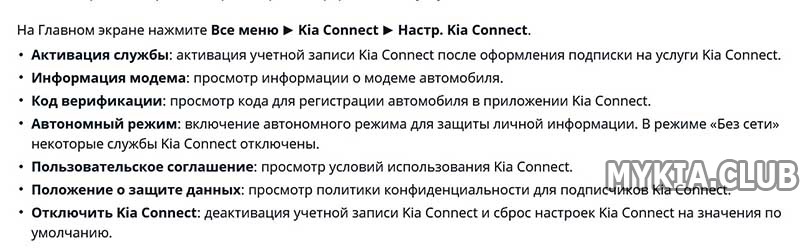
Клавиша “Reset” представляет из себя немного утопленную область. Чаще всего данная клавиша находится рядом с одним из регуляторов.
Я не могу найти эту «утопленную область»)) если можно фото скиньте пожалуйста
#20 *Станислав* Re: киа коннект
- Гость Киа Форума
Почему не работает киа коннект
The verification code expires after 20 minutes. Please be sure to use the code before the time expires. If you request another verification code, the previous verification code will no longer be valid.
Select the “Submit” button on the vehicle’s head unit. Wait for the “Kia Connect is active.” message on vehicle head unit. Then select “I have entered Verification Code” on your phone
Kia Connect is currently unavailable for Model Year 2022 vehicles sold or purchased in Massachusetts. See Kia Connect Terms of Service for more information.
Emails must be 30 characters or less. Passwords cannot contain any special characters.
Please verify you are logging in with the same credentials that you used in the head unit. If you used an email address, you will need to log into the app and the Kia Owner’s Portal (KOP) with the same email address. If you enrolled using your phone number and not your email address, you will need to use that phone number to log in.
Ensure that there is a strong signal for both the phone and vehicle. Also, specific conditions must be met in order for the remote command to execute.
- To remote start your vehicle, the vehicle doors, trunk and hood must be closed; the vehicle must be locked; and the vehicle must be in Park.
- For gas vehicles, the low fuel light must not be on.
- For 2015 Soul EVs and 2016 Soul EVs, the vehicle must also be plugged in.
- For Optima Plug-in Hybrids and Niro Plug-in Hybrids, the vehicle must not be plugged in.
- To remote charge your vehicle, the vehicle must be plugged in.
If you have not turned on your vehicle within the last 3-5 days, your vehicle systems are shut down to conserve battery power. If this occurs, remote commands will not execute. You will need to turn on your vehicle to ensure vehicle systems are active.
Valet Alerts can only be turned on or off in the app. Navigate to the Remote Security screen and select the man wearing a hat with the “!”. Green indicates valet alerts are ON; grey indicates valet alerts are OFF.
In order for remote climate schedules to work on your EV, your EV must be plugged in. If your EV is not plugged in at the scheduled time, the climate will not turn on.
In order for remote climate schedules to work on your plug-in hybrid, your vehicle must not be plugged in. If your vehicle is plugged in at the scheduled time, the climate will not turn on.
The horn and lights will turn off automatically after 2 minutes. If you wish to stop the horn and lights before the 2 minutes are up, you will need to send a lock or unlock remote command or lock or unlock the vehicle using your key fob.
If your vehicle is equipped with Kia Connect (formerly UVO link), download the “Kia Access” app.
If your vehicle has Kia eServices (formerly UVO eServices), download the Kia eServices app.
To verify which version of connectivity services your vehicle supports, check the Kia Connect availability matrix at Kia’s Owner Portal.
With Kia Access app, you can manage your vehicle ownership:
- View your financing information (for vehicles financed through Kia Motors Finance only)
- Schedule appointments at your preferred Kia dealership
- See upcoming service appointments at Kia dealerships
- Review and log maintenance information
- Review user manuals and videos
When you enroll in Kia Connect, you can also:
- Check current odometer reading
- Remotely lock/unlock your vehicle
- Remotely start your vehicle
- Set a regular schedule to start your vehicle
- Review any diagnostic trouble information
- Remotely start/stop charging your vehicle (EV/Plug-in Hybrids only)
- Set a regular charging schedule for your vehicle (EV/Plug-in Hybrids only)
*Remote/scheduled start not available on MY2019 Optima LX
Make sure that you have completed all of the following:
- Paired your smartwatch with your mobile phone device
- That you have logged into Kia Access app on your mobile phone
- That you are enrolled in Kia Connect
- That you have vehicles added to Kia Connect either through Kia Owner’s Portal or the Kia Access App
You must add your vehicles to Kia Connect on either the Kia Owner’s Portal or the Kia Access App. This can be done by adding your vehicles “VIN”, or “Vehicle Identification Number”.
If your vehicle is equipped with Kia Connect (formerly UVO link), download the “Kia Access” app.
If your vehicle has Kia eServices (formerly UVO eServices), download the Kia eServices app.
To verify which version of connectivity services your vehicle supports, check the Kia Connect availability matrix at Kia’s Owner Portal.
Once you activate Kia Connect with the Kia eServices app in your vehicle, you can:
- Save Points of Interest
- Set alert thresholds for driving times, speed, or areas
- Set a parking minder to make it easy to find your vehicle
- Review your driving information
- Contact Kia Roadside Assistance
- Diagnose whether problems exist within major vehicle systems
- Request an appointment at a Kia dealership
We use cookies and collect data when you use this site. For information on our data practices and how to exercise your privacy rights, please see our Privacy Policy.
About Our Vehicles
About Our Vehicles
- Service
- Accessories
- Kia Engine Settlement
- Kia HECU Settlement
- FAQs
- Parts
- Protect your Kia
- Kia.com
Legal
Legal
- General Privacy
- General Terms of Service
- MPG Disclaimer
- Contact Us
- Kia Connect Privacy Portal
- Kia Connect Privacy Policy
- Kia Connect Terms of Service
- Cookies Management
Notice to California residents: We collect and use personal information as described in our Privacy Policy. To exercise your right to opt-out of certain ways we share your personal information, please click here: Do Not Sell My Personal Information.
- Information Collected
Information Collected
We want to be transparent about the data we and our partners collect and how we use it, so you can best exercise control over your personal data. To learn about our collection and use of personal data, please see our Privacy Policy.
We use the following partners to better improve your overall web browsing experience. They use cookies and other mechanisms to collect information regarding your visit. Information about devices used to access our website may be collected and shared, even if this information is not tied to your name or other information that specifically identifies you. You can elect to opt-out of this information collection by unticking the boxes below.
We use the following partners to better improve your overall web browsing experience. They use cookies and other mechanisms to connect you with your social networks and tailor advertising to better match your interests. Information about devices used to access our website may be collected and shared, even if this information is not tied to your name or other information that specifically identifies you. You can elect to opt-out of this information collection by unticking the boxes below.
Почему не работает приложение My Renault, Мобикей Киа и Ниссан Коннект

Почему не работает приложение my renault? Дело в том, что некоторые зарубежные автопроизводители, включая Škoda, Kia, Infiniti, Nissan и Renault, ограничили доступ к своим мобильным приложениям для российских пользователей. Ранее клиенты могли удалённо управлять навигационными и информационно-развлекательными сервисами, а также открывать и блокировать двери и запускать двигатель. Однако в последних версиях обновлений мобильных приложений появились геоблокировки, которые не позволяют использовать эти функции в России, поэтому приложение Мобикей КИА не работает.
При этом некоторые производители, например, Volvo и Land Rover, позволяют использовать свои приложения без проблем как в России, так и за её пределами.
Некоторые эксперты предполагают, что в ближайшее время большинство автопроизводителей полностью отключат доступ к своим приложениям для российских пользователей. Владельцы автомобилей будут вынуждены искать другие способы удалённого управления своими машинами. Однако есть способы обойти геоблокировки с помощью VPN и регистрации аккаунта в другой стране.
Таким образом, ограничение доступа к мобильным приложениям зарубежных автопроизводителей для российских пользователей стало неудобством для многих владельцев автомобилей. Однако существуют способы обойти эти ограничения, которые позволяют продолжать использовать удалённое управление машиной.
Так как приложение Рено не работает, то придется смириться с тем, что прогревать машину удаленно или следить, где она станет невозможным.