
SIM Reader
Не будем особо подробно расписывать назначение сим ридера. Стоит только сказать, что с помощью SIM Reader / Writer можно считать информацию (прошивку или часть её) с SIM-карты и перепрошить (переписать считанную или имеющуюся информацию) multiSIM-карты. Устройство, собранное по схеме, позволяет находить необходимые коды Ki и IMSI для добавления уже существующих SIM-карт в multiSIM-карту. IMSI и Ki коды — это основные коды, которые идентифицируют сим-карту у оператора сотовой связи.
В схеме SIM reader использованы распространенные электронные компоненты, которые можно легко купить в любом электронном магазине. Этот SIM reader считывает информацию с сим-карт следующего характера: телефонная книга, SMS, IMSI, ICCID т.д. Вы можете использовать компьютерную программу SimScan v2.01 (ссылка на скачивание ниже) для взлома KI и IMSI, чтобы клонировать сим-карту или создать multiSIM. ВНИМАНИЕ! Создание клонов SIM-карт является противоправным деянием. Схема SIM reader приведена в ознакомительных целях. Администрация сайта mikrocxema.ru не несёт ответственности за действия радиолюбителей, применивших собранное устройство (SIM reader / writer) в нарушающих действующее законодательство РФ целях. Ладно, это лирическое отступление. Далее…
Питание собранного по схеме SIM reader производится за счет COM-порта компьютера и составляет 5 вольт. Проверить устройство можно “ответом на сброс” с помощью программы SimScan v2.01, используя кнопку “Тест” (ответом на сброс — ATR — answer to reset). Перед проверкой сим ридера подключите его к COM-порту, вставьте SIM карту в держатель и выберите правильный COM-порт и частоту кварцевого резонатора в настройках программы. Как правило, при качественной сборке и монтаже устройство работает сразу без какой-либо донастройки. Дополнительных драйверов не требуется.
Для считывания с SIM карт KI и IMSI кодов можно воспользоваться программой SimScan v.2.01. Затем, руководствуясь рисунком ниже, сделайте следующее. 1) Выберите COM-порт, к которому подключен SIM reader. 2) Выберите нужную частоту кварцевого резонатора. 3) Нажмите кнопку “Тест” для опроса устройства и проверки правильности настроек. 4) После получения ответа от сим ридера можно приступать к считыванию кодов из сим карты. Нажмите “Find KI”. Начнется поиск KI и IMSI кодов, который может занять от 15 минут до нескольких часов. Также вы можете использовать этот SIM reader / writer для чтения и редактирования телефонной книги, SMS, изменение PIN 1 и PIN 2 и т.д. С помощью, например, Sim Card Data Recovery можно даже восстановить удаленные из SIM карты SMS.
В следующей статье расскажем подробнее, как клонировать SIM карты или создать multiSIM карту из нескольких имеющихся у вас сим карт.
What is SIM Card Reader and How Does it Work?
SIM (Subscriber Identification Module) cards are still necessary for our lives. We use them to send and receive calls and texts and access the Internet wherever there’s carrier network coverage. Additionally, SIM cards store many things, including our personal and billing information and phonebook. With that said, it becomes somewhat obvious what SIM card readers are. However, having an idea and possessing a deeper knowledge are two different things. By the end, we intend to make you part of the latter group of people. With the groundwork laid out, here’s a detailed answer to the question, “what is SIM card reader, and how does it work?”
Definition
We define the SIM card reader as a device that allows you to insert a SIM card onto the designated slot. It has contact wires or thin contacts that read the data from the SIM card by touching the golden chip, known as the MOS chip. SIM card readers are also paired with software for your operating system. This is done for loading, analyzing, and sorting the data from the SIM card into a format that’s easily previewed. Every manufacturer of SIM card readers usually provides such software for free.
Appearance and size
The size of SIM card readers isn’t standardized. It largely depends on the number of features it has. Additionally, the build quality and thickness of the protective case depend on the price range. The majority of readers for SIM cards have the same shape and size as a USB stick e.g. flash memory. The difference is in two things:
- The core components we mentioned above are placed instead of the PCB with memory.
- There’s a thin slot (or multiple slots, based on compatibility) on the side or the back of the reader. It allows you to insert a SIM card or open the SIM card tray.
In some cases, SIM card readers are sold as part of a “Swiss army knife” gadget, paired with readers for various SD card sizes and smart cards. If so, the size is increased to approximately that of a credit card.
Operation
As mentioned above, the SIM card reader has a USB connector on one of its sides. To use it, follow these steps:
-
from your phone. Here’s a guide for removing SIM cards on iPhone, too.
- Determine the SIM card size that the reader accepts. Ideally, it’s the same size as your SIM card. If not, you can change it by adding or removing plastic rims that were left off when punching you punched it out of a full-size SIM card. If the device shipped with adapters, use them to the same effect.
- Open the SIM card tray on the reader and place it on it. Or, slide in the SIM card directly into the slot. Use the tiny SIM card icon on the reader itself for guidance on the position.
- Close the tray if a tray was used. Plug the USB connector of your SIM card reader into the USB slot on your computer.
- Download and install the matching software from the manufacturer’s website.
Tip: If it shipped with one, the version of software on a CD/DVD is likely outdated, plus CD/DVD readers are obsolete nowadays. - Open the software, and, unless it’s automatic, click on the Read button to import data.
Functionality
Now that you know how to operate it, here are some of the uses of SIM card readers:
No phone, no problem
Having a cheap reader of SIM cards is a great way to see your call history, SMS, and contacts list without having to buy an expensive smartphone. Even better, you can directly edit the data on it. This requires your device to be a SIM card reader/writer type, a feature it might already support. The only downside is that you cannot receive new information or reply since there’s no network antenna.
Backup
You don’t have to stop at reading SIM cards on your computer, simply export the data for safekeeping. And not only on your computer – some software supports direct cloud backup. If anything happens to the phone or the SIM card, you can import the data back to a new card. The latter ability also requires your device to support writing.
Data recovery
Forgot your PIN (or PUK number to reset the PIN) or had a phone hardware or software malfunction? The data on the SIM card is inaccessible or likely wiped out, right? Not necessarily – the card reader might allow you to bypass PIN restrictions. If not, you can enter the PIN in the software and unlock the SIM. You can extract a surprising amount of information this way, trust us. Afterward, buy a SIM card and restore it.
Spyware/Parental control
Being able to read information without the other person knowing can be good and evil. Parents controlling their children’s activity can save them from danger. On the other hand, that invasion of privacy can turn into outright spying, asserting control, and overprotecting. This applies to adults as well – it depends on how you use it.
Cloning
We already taught you how to clone a SIM card, listed its limitations, and mentioned that SIM card readers/writers are integral. There are plenty of benefits of SIM card cloning, but also superior alternatives to achieve them. We’d only use it if you have an unsupported SIM card or an outdated SIM card size. That way, you can clone data to a newer, blank SIM card.
Authentication and encryption
Every SIM card has a unique ICCID (Integrated Circuit Card Identification Number). For that reason, SIM card readers are widely used in factories, companies, government facilities, and any place with a need to authenticate the user’s identity. It’s superior to using passwords since physical access is required. A SIM card can also store a complex decryption key. In that case, reading data can unlock access to encrypted data.
Compatibility
We’ll mention what’s possible – always check the product description for the particular model. SIM card readers are compatible with SIM cards for Android and iOS devices, all widely-used networks (GSM, CDMA, and LTE), and carriers. Additionally, they support other versions of SIM such as USIM, R-SIM, X-SIM, R-UIM, and custom ones such as Nextel. Modern readers are also compatible with mini-SIM, micro-SIM, and nano-SIM cards and ship with adapters.
Что такое сим ридер
Наведите камеру, чтобы скачать приложение
- Загрузить из AppStore
- Загрузить из Google Play
- Загрузить из AppGallery
2004-2023 © Wildberries — модный интернет-магазин одежды, обуви и аксессуаров. Все права защищены. Доставка по всей России.
2004-2023 © Wildberries — модный интернет-магазин одежды, обуви и аксессуаров. Все права защищены. Доставка по всей России.
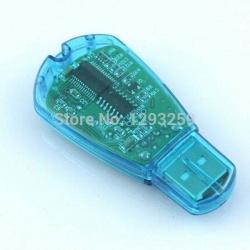
USB ридер SIM-карт.
Да, обычно этот номер может записать сама сигнализаия (трекер), пишет «первого дозвонившегося». Далее с этого номера управляющими SMS можно сделать все отсальные настройки, запись «тревожных номеров» в том числе.
Но видеть своими глазами на мониторе, править, копировать — гораздо удобнее. А уж если речь идёт о контроллере шлагбаума, где в SIM карту пишется до 250 открывающих номеров, да если одинаковый набор нужно прописать в SIM-карты нескольких шлагбаумов…
Ридер заказан 23.02.2015, получен 26.03.2015.
Алиэкспресс $1.85 видел как 118,33 руб., QIWI списал 117,95 руб. Курс ЦБ на тот день был 61.7235 (т.е. $1.85 = 114.19 руб).
Пришло скромном бумажном пакете, снаружи бумага, внутри «пупыртилен». Сам ридер и 80мм CD с драйверами и программами. 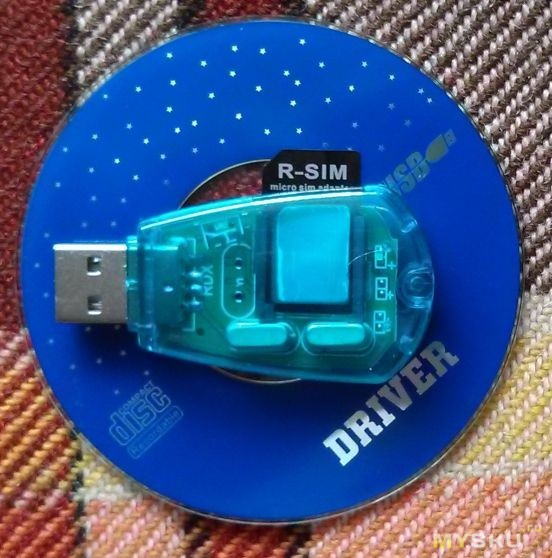
CD проверил свежей версией CureIt, ничего плохого она не нашла.
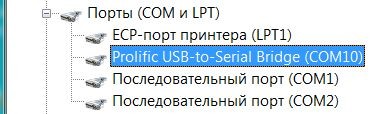
Vista увидела и поставила драйвера сама, но при установке программы чтения инсталлятор сам поставил свой пакет драйверов, но названия мелькали те же, после перезагрузки компа ридер продолжал работать. Встал как ридер на виртуальном COM-порту номер 10.
Т.к. старая SIM-карта была обрезана под новый телефон — пришлось использовать адаптер (на фото из ридера торчит адаптер).
Начинку видно без разборки, с одной стороны пара микросхем без маркировки, с другой пара, видимо, кварцев. При работе сквозь синий прозрачный пластик весело мигает красный светодиод.
Первый телефон все контакты хранил в SIM-карте, следующие имели собственную память, но предлагали импортировать контакты с SIM-карты. Андроид же тупо в контактах показывает всё подряд, старые из SIM (одно поле под имя латиницей, один номер телефона), и новые импортированные (с аватарой, кучей телефонов и других полей). Но записать номер в ячейку №1 SIM карты не предлагает.
Прилагаемый софт позволяет считывать с карты в программу телефонную книгу и сохранённые на карте SMS, редактирвать (пробовал номера) и записывать обратно в SIM-карту.
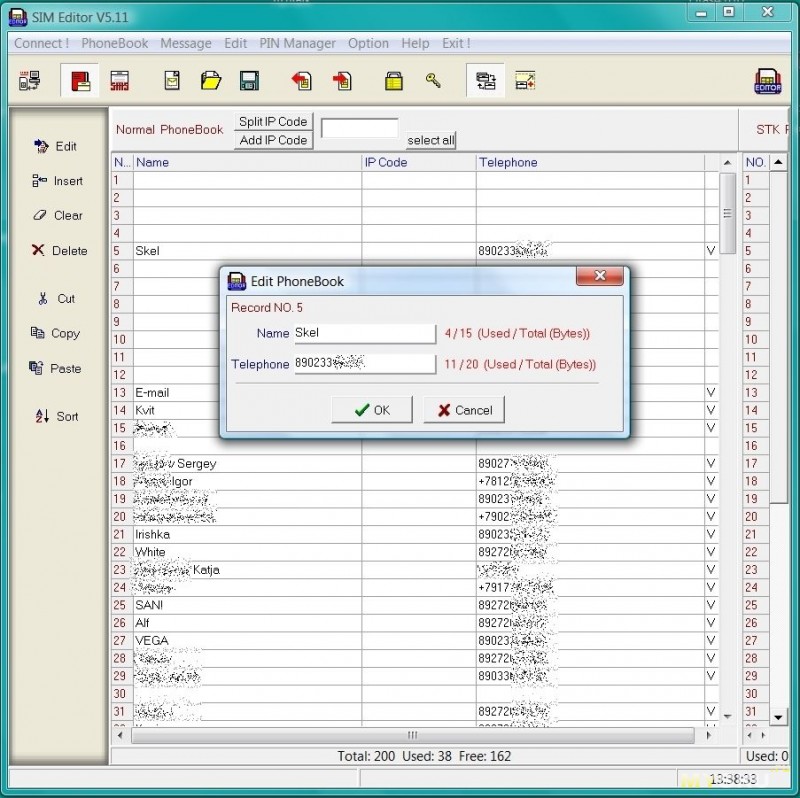
Я и не знал что на симке завалялись старые SMS… 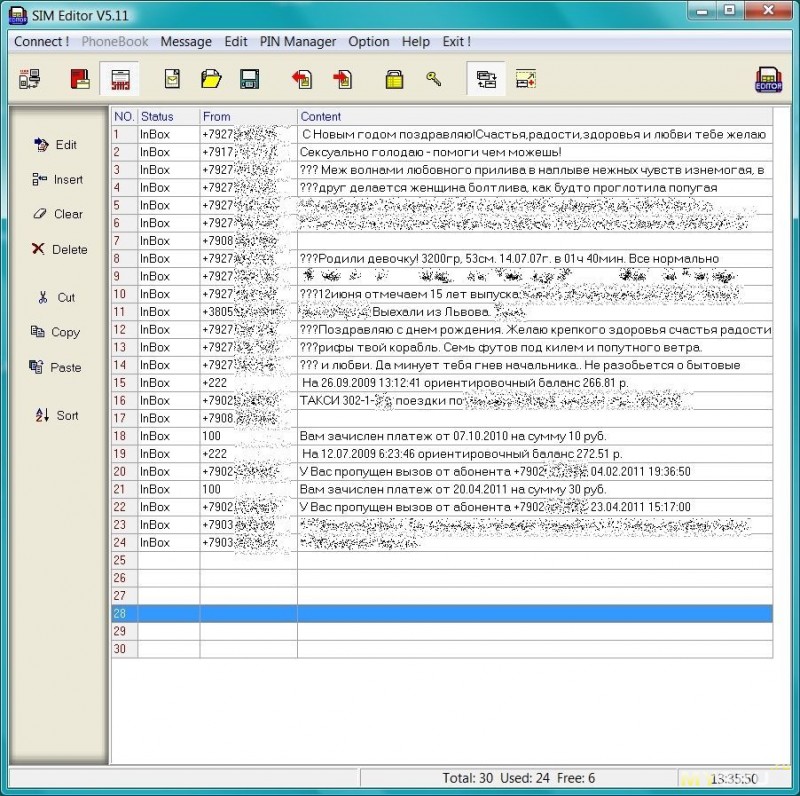
Почистил записи, вернул SIM в смартфон, в «Контактах» всё старьё пропало.
Можно ли клонировать SIM-карты через этот ридер — не знаю, не пробовал (и не планирую).
Из недостатков (ну надо же хоть какой-то недостаток найти) — слот под SIM не имеет никаких ориентиров как вставлять карточку. Надо контактами вниз скошенным уголком наружу.